Copy and paste an invisible character in one click: small, medium, large or giant. Use it for blank text, an invisible name in Free Fire or Discord, or a blank space in your Instagram highlights.
Copy by size
ㅤ
Generate multiple spaces at once
ㅤ
Test your invisible character
Result: No invisible characters pasted yet.
What is an invisible character?
An invisible character is a Unicode character that takes up space like a letter but shows nothing on screen. You’ll also see it called blank text, invisible text, an empty character or a blank space.
Unlike the regular space bar, which many apps trim or reject, an invisible character counts as real text. That’s why you can use it to leave a name blank, send an empty message or add spacing where a normal space won’t stick.
Blank space to copy and paste: small, medium, large and giant
Each size uses a different Unicode character. Here’s which one to pick:
| Size | Character | Unicode | Best for |
|---|---|---|---|
| Small | ( ) | U+205F | Subtle gaps between words |
| Medium | (ᅠ) | U+FFA0 | Spacing inside usernames and game names |
| Large | (ㅤ) | U+3164 | Blank names, empty messages and Instagram highlights |
| Giant | (ㅤ ×10) | U+3164 ×10 | Wide gaps and long blank text |
Large: the Hangul Filler (ㅤ)
This is the classic invisible character and the one that works in the most places. Its official name is Hangul Filler (U+3164), a character from the Korean alphabet that has no visible shape. The Large button copies two at once.
Giant blank space
Need a lot of empty space? The Giant button copies 10 Hangul Fillers in one click. For an exact amount, use the generator above: pick a number and hit copy.
Medium (ᅠ)
The Halfwidth Hangul Filler (U+FFA0) is half as wide as the large one. It’s handy when you want a small gap in a name without leaving a big hole.
Small ( )
The most subtle option, for a tiny gap between letters or symbols. If an app doesn’t accept it, switch to the medium one.
How to make an invisible name
An invisible name (or blank name) is simply a username made of invisible characters instead of letters. Copy a character above, paste it into the name field and save. Here’s how it works in popular apps and games:
Free Fire
- Copy the medium or large invisible character above.
- Open Free Fire and tap your profile.
- Tap the edit icon next to your nickname.
- Type your new name and paste the invisible character wherever you want a space. For a fully blank name, use only invisible characters.
- Confirm the change.
Changing your nickname in Free Fire may cost a Name Change Card or diamonds, so check the character in the tester above before you confirm. The same trick works for guild names and for BGMI or PUBG Mobile nicknames.
Discord
Paste an invisible character into your display name or server nickname to leave it blank, or use it to add spacing to channel names. If Discord removes it, try a different size.
TikTok
Paste the large character into the Name field under Edit profile to get an invisible name on TikTok. You can also use it to add blank lines to your bio.
Blank space for Instagram highlights
- Copy the Large invisible character.
- Open your profile and create or edit a highlight.
- Delete the name and paste the invisible character instead.
- Save. Your highlight now has no visible title.
The same character lets you add line breaks and spacing to your Instagram bio and captions.
How to send a blank text message
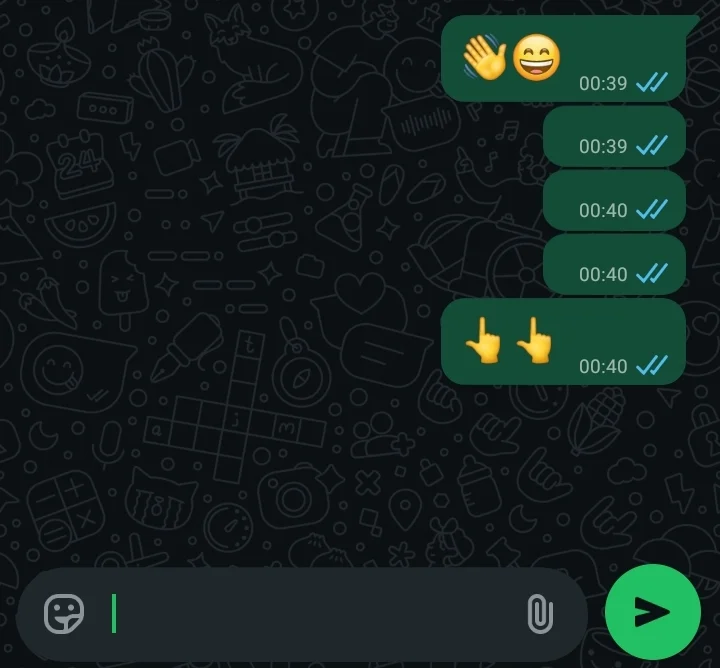
Copy the Large or Giant character, paste it into the message box and hit send. The message arrives empty. It works on WhatsApp, Telegram, Messenger and most other chat apps.
Invisible characters on iPhone
On some iPhones, invisible characters can disappear when you paste them or show up as a small box. If that happens:
- Use the medium or large size. They’re the most reliable on iOS.
- Paste with a long press → Paste.
- Check the result in the tester above.
- Update the app you’re pasting into.
Invisible character not working? Quick fixes
- A box (□) shows up: the app doesn’t support that character. Try another size.
- Nothing gets pasted: check the tester to see if the character was copied, then copy it again.
- Several spaces turn into one: some apps merge repeated characters. Use the generator or mix two sizes.
- “Invalid name” error: the app blocks that character. Change the size or move it to a different spot in the name.
Frequently Asked Questions
Is an invisible character the same as a space?
No. A regular space is often trimmed or blocked by apps, while an invisible character is treated like a letter, so it stays in place.
What is the Hangul Filler?
The Hangul Filler (U+3164) is a Korean Unicode character with no visible shape. It’s the most widely used invisible character and the one behind our Large and Giant buttons.
Can I get banned for using an invisible name?
An invisible character is a standard Unicode character, and each game or app decides whether to accept it when you save your name. Still, always follow the naming rules of the platform you’re using.
Does it work on Android and iPhone?
Yes. On iPhone, the medium and large sizes tend to work best.
Is this tool free?
Yes, it’s 100% free. No sign-up, no downloads.
Use invisible characters responsibly
Invisible characters are great for creative names and clean layouts, but use them with common sense. Follow each platform’s rules and never use them to confuse or mislead other people.